


PaiFlow插件服务CRUD详解:MCP同理
对于 PaiFlow 的用户来说,并不关心插件的 Schema 长什么样子,只管 CRUD 就好了,😄
当然了,对于首次接触 PaiFlow 的球友来说,插件服务的 CRUD 确实也需要花点时间去讲下,否则新手在第一次还真不太好说这些信息都会填。尤其是插件路径、授权方式的校验等信息,不太清楚该怎么填。
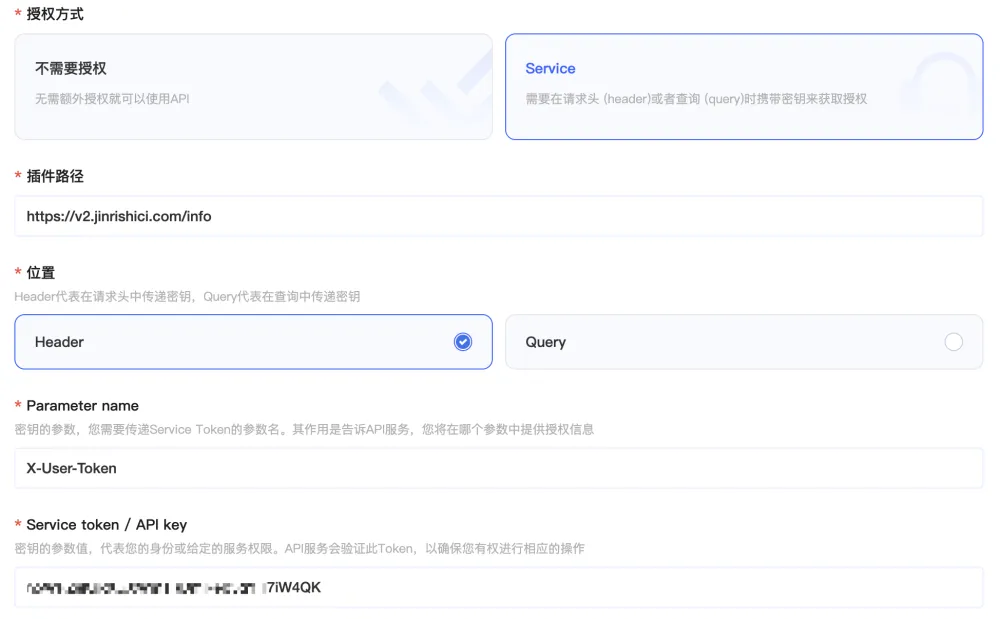
这篇就来手把手带大家实操一下。嘟嘟嘟,发车。
1.插件Schema的表结构
在 PaiFlow 中,我们把工具当成了一种可配置的资源。
和工作流的 DSL 很像,核心是一大段 JSON 字符串,因为 Link 服务的本职工作是把工具调起来,它不想关心工具背后是谁写的、用什么语言写的,它只需要有一份足够完整的说明书,能把请求拼出来就行。
在 PaiFlow 中,插件 Schema 一共存了两份。一份是给控制台 hub 用的,放在 paiflow-console.tool_box 表中。除了 schema 本体,往往还会带一些展示和运营属性,比如工具名称怎么展示、分类、备注、是否启用、是谁录入的、更新时间之类的。
另一份是给 Link 服务用的,放在 paiflow-link.tools_schema 表中。它更偏执行视角,关注怎么调用工具:schema 原文长什么样、工具的版本号是多少、解析后需要的关键信息能不能稳定拿到。
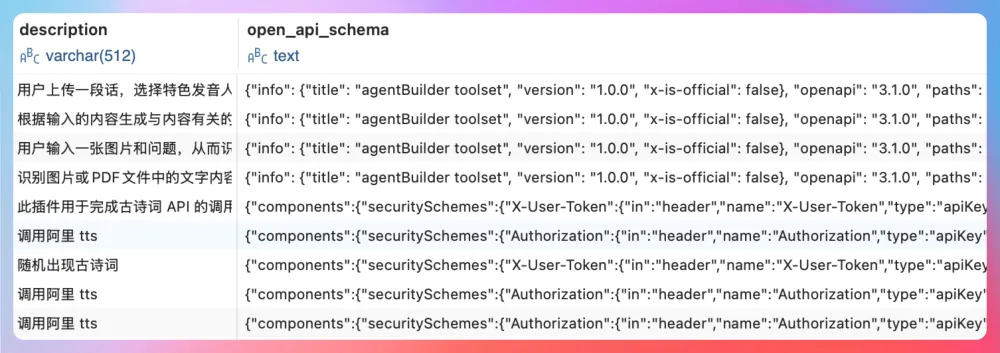
工作流引擎要调用工具时,Link 服务就是从这张表里把 schema 拉出来进行解析、拼请求,然后发出去,把结果再塞回工作流的。
1.1 tool_box 表结构
tool_box 中的字段信息如下所示,主要给前端使用,包含工具的图标、说明、web_schema、schema、鉴权等信息。
CREATE TABLE `tool_box` (
  `id` bigint NOT NULL AUTO_INCREMENT COMMENT 'Primary key',
  `tool_id` varchar(30) DEFAULT NULL COMMENT 'Core system tool identifier',
  `name` varchar(64) DEFAULT NULL COMMENT 'Tool name',
  `description` varchar(255) DEFAULT NULL COMMENT 'Tool description',
  `icon` varchar(255) DEFAULT NULL COMMENT 'Avatar icon',
  `user_id` varchar(256) DEFAULT NULL COMMENT 'User ID',
  `app_id` varchar(60) DEFAULT NULL COMMENT 'appid',
  `end_point` text COMMENT 'Request address',
  `method` varchar(255) DEFAULT NULL COMMENT 'Request method',
  `web_schema` longtext COMMENT 'Web protocol',
  `schema` longtext COMMENT 'Protocol',
  `visibility` int DEFAULT '0' COMMENT 'Visibility 0: only visible to self, 1: visible to some users',
  `deleted` tinyint(1) DEFAULT '0' COMMENT 'Whether deleted: 1-deleted, 0-not deleted',
  `create_time` timestamp NULL DEFAULT NULL COMMENT 'Creation time',
  `update_time` timestamp NULL DEFAULT CURRENT_TIMESTAMP ON UPDATE CURRENT_TIMESTAMP COMMENT 'Modification time',
  `is_public` bit(1) DEFAULT b'0',
  `favorite_count` int DEFAULT '0' COMMENT 'Favorite count',
  `usage_count` int DEFAULT '0' COMMENT 'Usage count',
  `tool_tag` varchar(255) DEFAULT NULL,
  `operation_id` varchar(255) DEFAULT NULL,
  `creation_method` tinyint DEFAULT '0',
  `auth_type` tinyint DEFAULT '0',
  `auth_info` varchar(1024) DEFAULT NULL,
  `top` int DEFAULT '0',
  `source` tinyint DEFAULT '1',
  `display_source` varchar(16) DEFAULT '1,2',
  `avatar_color` varchar(255) DEFAULT NULL,
  `status` tinyint NOT NULL DEFAULT '1' COMMENT 'Status 0: draft, 1: formal',
  `version` varchar(100) DEFAULT NULL,
  `temporary_data` mediumtext COMMENT 'Plugin temporary data',
  `space_id` bigint DEFAULT NULL COMMENT 'Space ID',
  PRIMARY KEY (`id`)
) ENGINE=InnoDB AUTO_INCREMENT=9 DEFAULT CHARSET=utf8mb4 COLLATE=utf8mb4_0900_ai_ci
以古诗词插件为例:
id: 8
        tool_id: tool@718dbda04bc
           name: 今日诗词
    description: 今日诗词
           icon: http://oss-beijing-m8.openstorage.cn/SparkBotProd/icon/common/emojiitem_00_10@2x.png
user_id:...企业级Agent工作流编排项目PaiFlow
Vibe Coding版本的PaiAgent
派聪明RAG AI知识库Java版本+Go版本
微服务 PmHub、技术派、MYDB
求职派JobClaw(OpenClaw/Hermes架构
PaiCLI(类似Claude Code的Agent
派简历(代码已完成)
等实战项目。
1. 微信扫右侧的优惠券加入知识星球
2. 解锁星球的实战项目教程和源码: 项目源码+教程获取
5人已点赞





回复